Live Activities
Your website traffic, live on the Lock Screen.
Site Pulse brings Google Analytics 4 to iPhone and iPad Live Activities: the people on your sites right now, minute by minute, on the Lock Screen, in the Dynamic Island, in StandBy, on Apple Watch and in CarPlay.
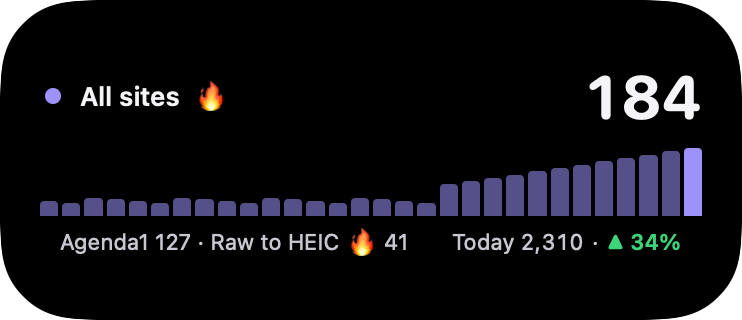
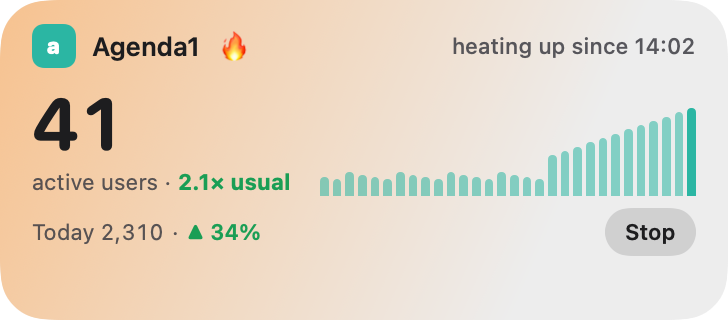
At a glance
Everything on one card.
-
People right now
Everyone on the site, or on all your sites, in the last 30 minutes.
-
A bar a minute
The last half hour as a skyline, so you see a rise as it happens.
-
Today vs yesterday
“Today 2,310 · ▲ 12%”, compared with yesterday.
-
Your sites as chips
Up to three sites, the spiking ones first, then “+ N more”.
-
Top country and page
Where the crowd is and what it’s reading.
-
Spike details
“2.1× usual · +38 in 5 min” the moment a site spikes.
Everywhere it shows
Wherever you glance.
Lock Screen
The full card, on iPhone and iPad.
Dynamic Island
Compact, minimal and expanded.
StandBy
Big and readable while your iPhone charges on its side.
Apple Watch
In the Smart Stack.
CarPlay
On the CarPlay Dashboard.
Always honest
It tells you when it’s live.
The status line says exactly how fresh your numbers are, so you never trust a stale one.
-
live · 14:32Updating every minute -
2.1× usual · +38 in 5 minA site is spiking -
Updates slowed by iOSTurn on More Frequent Updates -
paused · last update 14:32The numbers are from 14:32 and catch up by themselves -
paused · reconnect in Site PulseGoogle needs you to sign in again -
ended 14:32Stopped by you or by iOS
Start one
Three ways in.
- Tap Start Live Activity on the dashboard.
- Open a site and tap the Live Activity button in its toolbar.
- Tap a spike notification, or turn on Start a Live Activity when a site spikes.
iOS ends every Live Activity after eight hours. Start a new one whenever you like.
How it stays live
Updated every minute, even closed.
To update while the app is closed, Site Pulse’s server reads your live numbers from Google every minute and sends them to your Live Activity through Apple. It keeps your Google account ID and an encrypted, read-only permission, never your email. Delete it any time with Delete my Live Activity data in Settings; if you stop using Live Activities, it’s deleted after 30 days.
How your data is protected ›Live Activity questions.
Do I need Site Pulse Pro?
You can try a Live Activity with the built-in demo sites for free. Live Activities for your own websites are part of Site Pulse Pro.
Why does it say “Updates slowed by iOS”?
iOS limits how often a Live Activity can change. Open the Settings app › Site Pulse › Live Activities and turn on More Frequent Updates to get every minute.
Why did my Live Activity end?
iOS ends every Live Activity after eight hours. Start a new one, or turn on Start a Live Activity when a site spikes and Site Pulse starts one the next time a site spikes.
Can it follow several websites?
Yes. Choose All sites for your total with a chip for each site, or follow just one site.
 RawToHEIC
  MergeHDR
  Filters
  Photo Geotag
  Copyrighted
  Camera Grid
  Photo Tape